
We’ve enhanced the catering ordering experience to help you confidently order the right amount of food for your event. With our new serving headcount configuration, you’ll benefit from:
Clear serving size visibility
Dynamic headcount calculations
Smart recommendations to ensure your guests are well-fed—without over-ordering
Menu Configuration
Brands can now define how many people each menu item serves—either as a single number or a range. This helps you better understand portion sizes while planning.
To support this, calorie information can now also be entered as a range, based on the number of people served.
Customer flow updates
We’ve moved the “How many people will you be serving?” question to the beginning of your ordering journey. This helps us:
Tailor menu recommendations (especially for bundles – coming soon!)
Show a cost-per-head estimate in your cart
Alert you if your order might not be enough—or is too much—for your event size
Catering Menu
Menu item quantity update
When adjusting quantities:
Clicking the quantity field highlights the number for easy editing
Entering “0” will automatically change to “1”
Only numeric input is allowed (up to 3 digits)
Important Notes:
Increasing quantity multiplies the number of people served
The price per person is calculated by dividing the total price by the number of people served
If a product serves a range, we use the higher number for price-per-person calculations
The Add button updates to reflect the total price based on quantity
Serving count inheritance
If a main product has a serving count, it overrides any serving counts in its child products
However, if the main product doesn’t have a serving count, it can inherit from child products—only if they belong to the Size product group
Products in size groups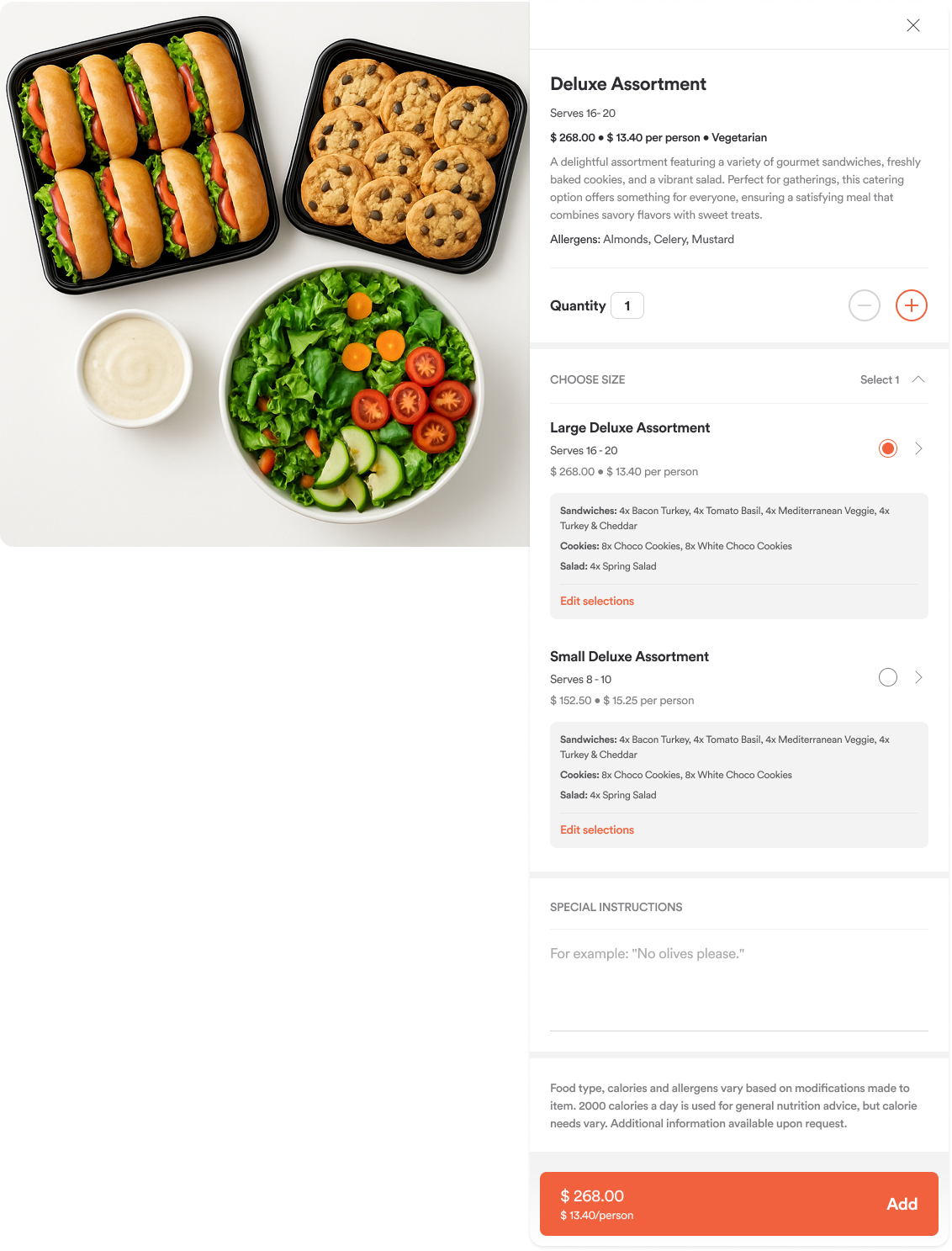
For products grouped by size:
If the item serves more than one person, we’ll show:
Number of people served
Total price
Price per person
Calories per person
Got Enough?
We’ll help you double-check your order with a smart prompt:
No prompt if your order matches your guest count
“Too much?” if your order exceeds your guest count (e.g., serving 75–100 for a party of 60)
“Need more?” if your order falls short (e.g., serving 16–20 for a party of 60)
Receiving guest
At checkout, you can now specify who will be receiving the order—perfect for events where the recipient isn’t the person placing the order.
Mobile flow
All these updates are fully optimized for mobile, so you can plan your event on the go with ease.
Comments
0 comments
Please sign in to leave a comment.